
Porthole: A Pocket Watch for the Age of Personal Intelligence



Porthole did not begin as a product idea. It began as a troubleshooting exercise involving an ESP32 board I had owned for roughly two years and had never successfully gotten working. It was a LilyGo T-Display-S3. Nice little board. ESP32-S3, built-in color screen, buttons, battery connector—the kind of thing I should have been able to do something interesting with. Except the display never worked correctly.
I tried everything. Different libraries. Different examples. Different configurations. Other people's code. At one point I downloaded somebody else's finished project and flashed it directly to the board, assuming that would at least tell me whether the hardware was bad. Same problem. Consistently. For two years.
Eventually I decided the screen was probably defective and tossed the board into the growing collection of tiny computers I might eventually return to after developing more patience or sustaining a head injury. Then, a few days ago, I pulled it back out. Not because I had a grand plan. I just wanted to see whether Codex could diagnose it.
I asked it to write a minimal display test. Nothing ambitious. Just light up the screen and prove the thing was not dead. It worked. Immediately. Apparently the board had been fine the entire time. The problem was likely some miserable library, configuration or initialization detail that I had repeatedly inherited from every example I tried. So I asked Codex to make it do something else. That worked too. Then something else. Also worked.
Far too easily. And that is the slip-and-fall origin story of Cora's Porthole. I did not design a product. I tripped over a working display and fell directly into one.
From Working Screen to Agent Display
Here is the thing about getting a screen to work after two years of failure: you don't stop at "the screen works." You immediately ask the next question, which is the same question I always ask: okay, now that it works, what else can it become?
The answer came fast. If I could push text to the screen, I could push anything to it. Weather. Calendar items. Status updates. QR codes. Article publish confirmations. Build progress. Meeting cues. But the interesting move wasn't just pushing data to a screen. The interesting move was connecting it to CORA. CORA already operates as my cognitive operations layer—managing workflows, publishing articles, tracking projects, handling the institutional machinery that turns ideas into durable assets. What it lacked was a physical surface. A place to exist outside the chat window. I'd been running everything through a browser or a phone. CORA could send me messages, but it couldn't surface information ambiently. It couldn't show me something at a glance without me asking for it.
The Model Context Protocol—MCP—was the bridge. MCP is the standard that lets AI agents talk to external tools. CORA already uses it for everything else. Connecting Porthole was just another MCP server. Once that connection existed, Porthole wasn't a screen anymore. It was an endpoint. A physical node in CORA's operational network.
CORA could push information to my desk without me asking. Meeting in five minutes? It shows on the screen. Article published? The screen confirms. Build running? Progress bar, live. The board went from "broken thing in a drawer" to "agent-controlled ambient display" in about an afternoon.
What Porthole Actually Does
Let me be concrete, because abstract descriptions of "ambient intelligence" tend to sound like a TED talk that hasn't happened yet. Porthole sits on my desk. It's a 320×170 pixel color screen with three addressable LEDs. Small enough to glance at, not so small it's useless. The screen can display text scenes, QR codes, images, scrolling tickers, and progress bars. The LEDs run independently—solid, pulse, chase, blink, rainbow.
Right now, CORA uses it for: Meeting cues. Two minutes before a calendar event, Porthole shows the meeting title and a QR code for the video link. I scan it with my phone and I'm in the meeting. No opening calendar, no searching for the link, no fumbling.
Weather. Tomorrow's forecast, pushed on command or on a schedule. High, low, conditions, rain probability. Glance and go. Article pipeline status. When we run the Tier 1 publishing pipeline—cover image, audio, Wix publish, social distribution—Porthole shows progress as it moves through each stage. I know where things are without checking.
LinkedIn QR. Walk into a networking event, Porthole shows a QR code to my LinkedIn profile. Someone scans it, they're connected. It's a business card that's never out of date.
LED state. Solid glow means normal operation. Pulse means something's processing. Chase means a notification landed. Blink means something needs attention. The lights are ambient—I don't have to look at the screen to know something happened.
The key design principle: Porthole surfaces what matters without me opening anything. It sits in my peripheral vision and tells me what I need to know. It's not a device I interact with. It's a device that exists so I don't have to interact with anything else.
The Living Business Card
Here's where it gets interesting. The LilyGo board has battery support. It's portable. Which means Porthole doesn't have to live on my desk. Walk into a meeting. Porthole shows your next calendar item and the attendee list. Walk into a conference. It shows your LinkedIn QR. Walk into a client site. It shows the project status for that specific client. The display changes based on context. It's not a static business card—it's a contextual identity surface. What it shows depends on where you are and what's relevant. A traditional business card carries one piece of information: who you are. Porthole carries a different answer to that question depending on who's asking.
That's not a gadget. That's a different model of personal presence
The Java Ring
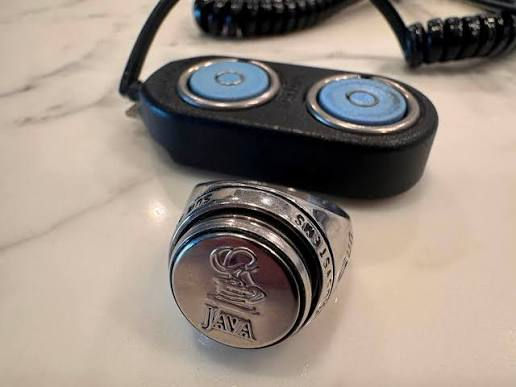
In 1998, Dallas Semiconductor unveiled the Java Ring at the JavaOne conference.
It was a physical ring—wearable jewelry—with an embedded Java-compatible microprocessor. The idea was elegant: your digital identity, cryptographic keys, and personal data lived on your finger. You walked up to a reader, touched it, and your information transferred. Touch-and-go computing.
The Java Ring was ahead of its time by about 25 years. The hardware worked. The vision was sound. What didn't exist was the ecosystem—the readers, the network, the services that would make a personal endpoint meaningful. The ring had nowhere to connect to. It was a node in a network that hadn't been built. So it became a curiosity. A footnote. A "wasn't that a neat idea" from the late '90s.
Porthole is the same idea, arriving at the right time. The difference isn't the hardware. The Java Ring had more sophisticated identity primitives than a LilyGo board. The difference is the network. CORA exists. MCP exists. AI agents that can act on information exist. The infrastructure that the Java Ring needed in 1998 is here now.
Porthole isn't a ring. It's a screen. But the concept is identical: a portable, personal computing endpoint that carries your identity and your agent's presence into physical space. Dallas Semiconductor built the right idea in the wrong decade. I built a cruder version of the same idea because the decade finally caught up.
Hardware-Independent
Here's the part that matters beyond my specific desk. The LilyGo T-Display-S3 is not special. It's a capable little board, but it's one of dozens of ESP32-class devices with screens, battery support, and Wi-Fi. I could have used any of them.
What makes Porthole work isn't the hardware. It's the protocol layer. MCP is the standard. CORA is the intelligence layer. The screen is just the surface. Which means Porthole isn't a product. It's a pattern. Any screen, any display, any physical endpoint that speaks MCP becomes a Porthole. The specific board doesn't matter. The specific display size doesn't matter. What matters is the connection between a personal AI agent and a physical surface the user can see. You could build a Porthole out of a Raspberry Pi and a seven-inch touchscreen. You could build one out of an e-ink display and an ESP32-C3. You could build one out of whatever's in your drawer. The hardware is interchangeable. The pattern isn't.
The Hardware Was Waiting for the Software Friction to Disappear
There are drawers, workshops and garages filled with abandoned hardware projects that did not fail because the ideas were bad. They failed because one library was outdated.
One display driver was initialized incorrectly. One pin assignment was wrong. One dependency had changed. One undocumented setting stood between the object and the idea. The cost of discovering that problem was often greater than the perceived value of the experiment, so the device went back into the drawer. AI coding tools alter that equation. They do not merely help experienced developers type faster. They make it economically rational to revisit hardware that was previously not worth fighting with.
That is exactly what happened here. I did not spend a weekend rebuilding my knowledge of LilyGo's display stack. I asked Codex to test the screen. It worked.
Then I asked for the next thing. And the next. By the time I realized what had happened, the supposedly broken board had become a physical endpoint for my AI agent.
The board did not change. The ability to command the complexity changed. And that distinction is the whole story. Every drawer in the world has a Porthole in it. Some board that almost worked. Some project that was 90% there. Some idea that died not because it was wrong but because the last 10% wasn't worth the suffering. AI coding tools don't just help you build new things. They recover the dead ones. They make it rational to reopen the drawer.
The Real Pattern
I keep coming back to the same observation because it keeps being true. The hardware did not suddenly become more capable. The friction disappeared. Two years ago, that board was a frustrating dead end. Today, it's a contextual business card, a meeting cue display, a weather station, a build progress monitor, a LinkedIn sharing tool, and the first node in what I suspect will become a distributed physical nervous system for CORA.
Same board. Same screen. Same processor. Same memory.
The only thing that changed is that I could finally tell it what to do without spending a weekend fighting someone's broken Arduino library. That's the pattern. Not just for Porthole. For everything. AI doesn't just create new capabilities. It unlocks old ones. It makes dormant ideas executable. It reaches into the drawer and pulls out the thing you gave up on, and says: try again. Porthole isn't a pocket watch. It's what a pocket watch would be if the pocket watch could think, change its face based on context, and talk to an AI agent that knows your schedule, your projects, and your next move. It's a pocket watch for the age of personal intelligence. And it was sitting in a drawer the whole time.
GITHUB Project:

Rich Washburn is a technologist and strategist working at the intersection of AI, infrastructure, and capital. He is Managing Partner and Chief AI Officer at Eliakim Capital.


Comments